<?xml version="1.0" encoding="utf-8"?><feed xmlns="http://www.w3.org/2005/Atom" xml:lang="en"><generator uri="https://jekyllrb.com/" version="3.10.0">Jekyll</generator><link href="https://blog.fdo.cr/feed.xml" rel="self" type="application/atom+xml" /><link href="https://blog.fdo.cr/" rel="alternate" type="text/html" hreflang="en" /><updated>2026-11-14T06:18:19+00:00</updated><id>https://blog.fdo.cr/feed.xml</id><title type="html">blog.fdo.cr</title><subtitle>I&apos;m Fernando and this is my captain&apos;s log, my little corner of the internet.</subtitle><author><name>Fernando Valverde</name><email>fernando@fdo.cr</email></author><entry><title type="html">There are many rangefinder apps but this one is mine</title><link href="https://blog.fdo.cr/grind-golf" rel="alternate" type="text/html" title="There are many rangefinder apps but this one is mine" /><published>2026-11-14T04:00:00+00:00</published><updated>2026-11-14T04:00:00+00:00</updated><id>https://blog.fdo.cr/grind-golf</id><content type="html" xml:base="https://blog.fdo.cr/grind-golf"><![CDATA[<p>In the age of software abundance I built <a href="https://grind.fdo.cr">my own rangefinder app for when I golf</a>. I have one VPS where I stack weekend projects using the <a href="https://github.com/basecamp/once">ONCE CLI</a>, I love that thing.</p>

<h2 id="golf">Golf</h2>

<p>If you’re not familiar with golf, it’s pretty important to know the distance to your target. For roughly half of those shots you actually do benefit from a rangefinder (laser, GPS watch, mobile app, etc) so a billion dollar industry exists to solve that problem for golfers.</p>

<p>I belong to the subset of players that wants to improve their game and I found inspiration on YouTube. Some different stats that aren’t exactly the well known stats used in golf. I was intrigued.</p>

<p>Since I was already fed up with the ads on an app’s free tier I used at the time, it was clear to me I could build my own. One that would help me understand the stats I wanted to improve and serve as a rangefinder while I play, all in one app.</p>

<h2 id="the-stackarchitecture">The stack/architecture</h2>

<p><a href="https://grind.fdo.cr">Grind</a> is Open Source. It was built with the goal of anyone being able to use it without registering and even without the mobile app.</p>

<p>The mobile app does provide some nice perks and an account will keep your history at hand (scores and stats), but even “in incognito” you can simply get your round summary sent to your inbox when you’re finished.</p>

<p>Agents did most of the heavy lifting but I was pretty intentional on the building blocks I wanted grind to have. Here are some notes about it:</p>
<ul>
  <li>Ruby on Rails with the “Solid Stack” on SQLite makes cramming a bunch of low traffic projects in a single VPS a breeze</li>
  <li>Hotwire is simple to read and understand as a human with rails exposure (both Ruby/Rails code and also Stimulus/JS)</li>
  <li>Hotwire Native for the mobile app is so simple, all of a sudden I have access to native GPS features and a better UX across some lovely details compared to a PWA on iOS</li>
  <li>On the golf course we could lose internet connection so a PWA service worker is essential, which makes support for Android low hanging fruit (Hotwire Native on Android is a nice to have)</li>
  <li>CI/CD with git tags on GitHub Actions and GitHub Packages. ONCE simply deploys the public Docker image</li>
</ul>

<h2 id="yardages">Yardages</h2>

<p>It sounds easy, but we need GPS coordinates in a polygon shape and do some math to know how far our current device’s GPS coordinates are from our target (the green). We need front, center and back of the polygon, and the front/back are relative to your position (they’re not perfect circles).</p>

<p>Since &amp; repeat for 18 holes. Fun stuff that took a couple of hours to code with agents before it was usable.</p>

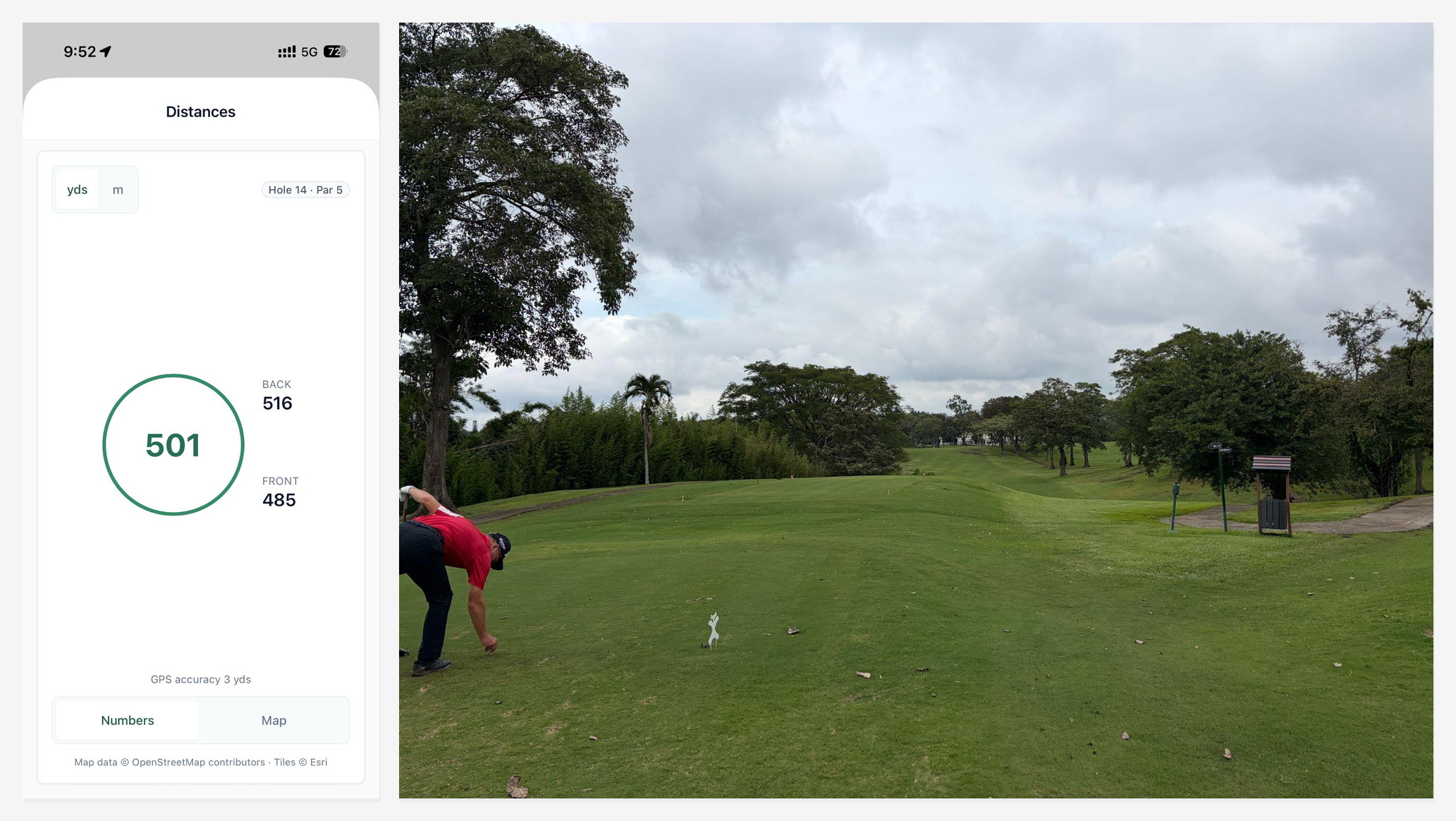
<p>On the course you don’t always get to see the hole (your target) from where you’re standing. Here’s a side by side view of what I see and what grind shows me:</p>

<p><img src="/assets/grind_distances_tee.jpg" alt="Distances on the tee in a par 5" />
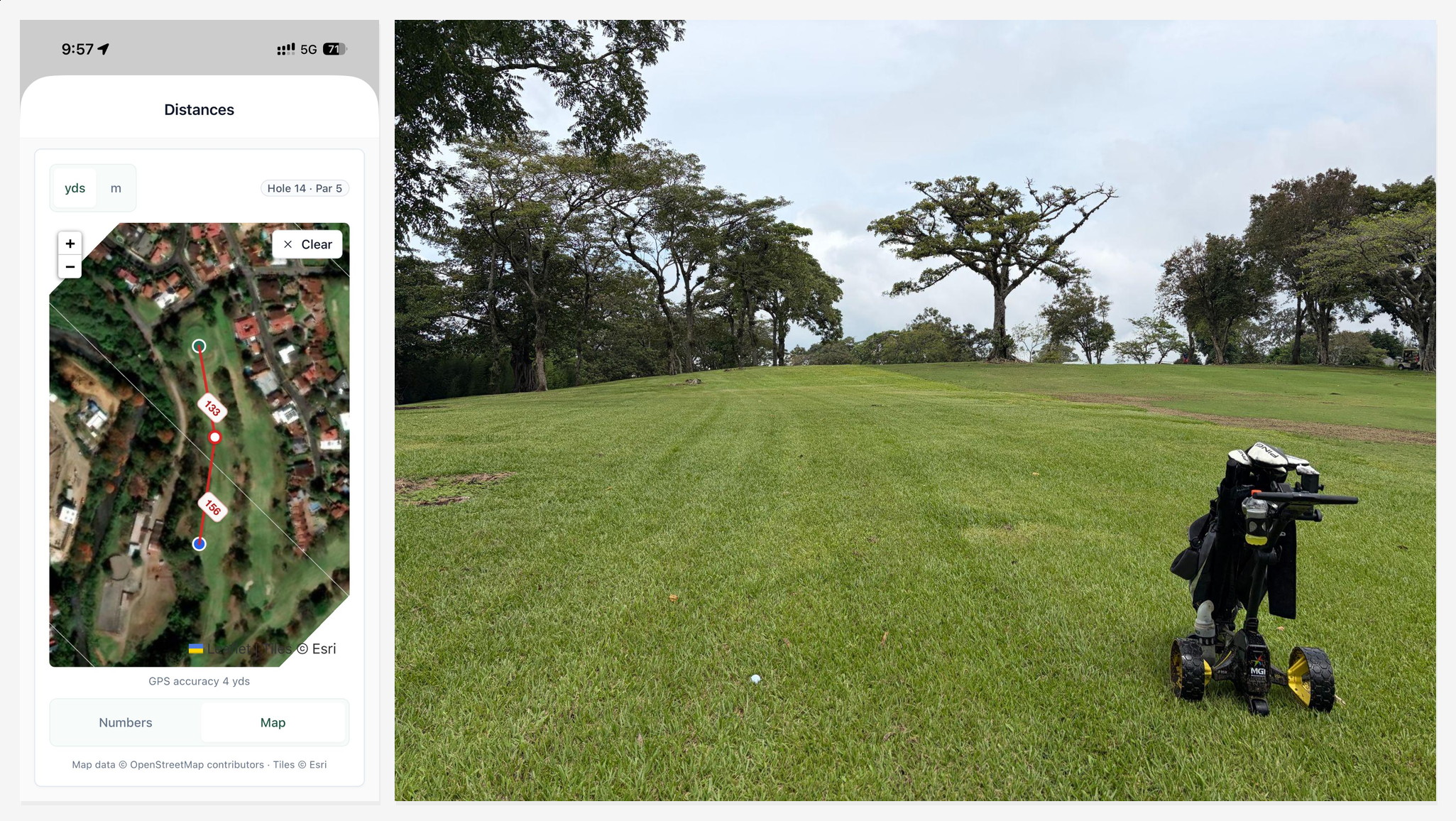
There’s actually two views: The simple numbers screen (above) and the map screen (below). The map is great to split a long distance and plan out your next shot(s).</p>

<p>This was my view after my first shot. It was quite poor and I still had a long way to go (still can’t see the target):</p>

<p><img src="/assets/grind_distances_fairway.jpg" alt="Map of the layup in the same par 5" /></p>

<h2 id="the-round">The round</h2>

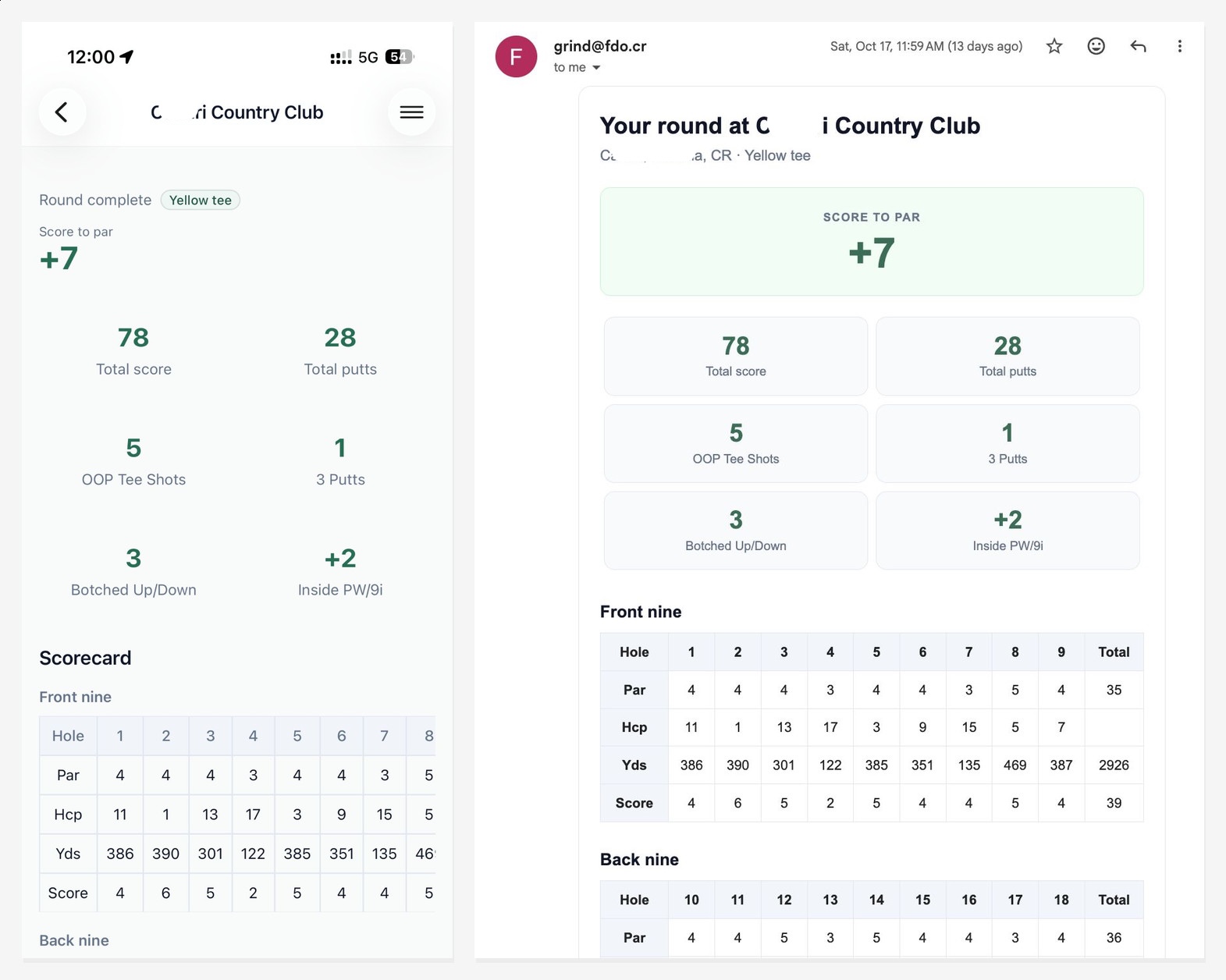
<p>Once you’re finished this is what the stats and the email you get looks like:</p>

<p><img src="/assets/grind_round_summary.jpg" alt="Phone summary and the stats email for a round" /></p>

<h2 id="conclusions">Conclusions</h2>

<p>These are all pretty standard rangefinder app features. Incumbents actually have a smoother UI (native instead of web based) and better datasets (golf courses and their GPS coordinates). Those native apps weigh hundreds of megabytes though and grind is 810 KB. Grind can be tweaked to my liking or to <a href="https://github.com/fdocr/grind">someone’s request/suggestion on GitHub</a> anytime <em>*wink*</em> <em>*wink*</em></p>

<p>I’ve been using it every round I play and it’s been great. Check it out at <a href="https://grind.fdo.cr">grind.fdo.cr</a> or in the <a href="https://apps.apple.com/us/app/grind-golf/id6787446479">iOS App Store</a> if interested</p>

<p>Pura vida.</p>]]></content><author><name>Fernando Valverde</name><email>fernando@fdo.cr</email></author><category term="golf" /><category term="grind" /><category term="hotwire" /><category term="rails" /><category term="pwa" /><summary type="html"><![CDATA[In the age of software abundance I built my own rangefinder app for when I golf. I have one VPS where I stack weekend projects using the ONCE CLI, I love that thing.]]></summary></entry><entry><title type="html">Clawshier OpenClaw Skill</title><link href="https://blog.fdo.cr/clawshier-openclaw-skill" rel="alternate" type="text/html" title="Clawshier OpenClaw Skill" /><published>2026-04-08T04:00:00+00:00</published><updated>2026-04-08T04:00:00+00:00</updated><id>https://blog.fdo.cr/clawshier-openclaw-skill</id><content type="html" xml:base="https://blog.fdo.cr/clawshier-openclaw-skill"><![CDATA[<p>I’ve been meaning to take a stab at this idea of automating a process to <em>take a picture of any receipt and log it to an expenses spreadsheet</em>. Clawshier is the OpenClaw skill that came as a result. It’s <a href="https://github.com/fdocr/clawshier">open source on GitHub</a> and <a href="https://clawhub.ai/fdocr/clawshier">available in ClawHub</a>.</p>

<h2 id="is-it-any-good">Is it any good?</h2>

<p>Far from perfect but a fun project. Image recognition is currently the weakest link. It currently supports two providers: OpenAI (default) and Ollama.</p>

<p>OpenAI sometimes refuses to process the image but I simply retry after a minute and that’s it. I’d say <a href="https://youtu.be/IKiSPUc2Jck?si=7satXBjhc5Bnbbut&amp;t=81">60% of the time, it works every time</a>. Quality of extraction is quite good for establishment name, expense category recognition, totals and taxes. Thermal receipt pictures with poor lighting can be very tricky, on top of cryptic text/acronyms in them. I traced the image recognition step to take between 5 and 12 seconds which is good.</p>

<p>For Ollama I tried <a href="https://ollama.com/library/llama3.2-vision">llama3.2-vision:11b</a> due to my available memory (fits in my 16GB RAM), but sadly was unusable. Infinite loops (extracting one line thousands of times), hallucinations and taking too long to process. 5 minute timeouts sometimes worked but essentially a coin toss whether it would extract “something” or simply hang/crash.</p>

<p>I ran benchmarks and I had to downsize the image to 512px to consistently avoid those timeouts, but that degraded the image too much for it to be usable. Perhaps the <a href="https://ollama.com/library/llama3.2-vision">llama3.2-vision:90b</a> would perform better… Wish I had a Ryzen Strix Halo with that juicy RAM.</p>

<h2 id="what-does-it-look-like">What does it look like?</h2>

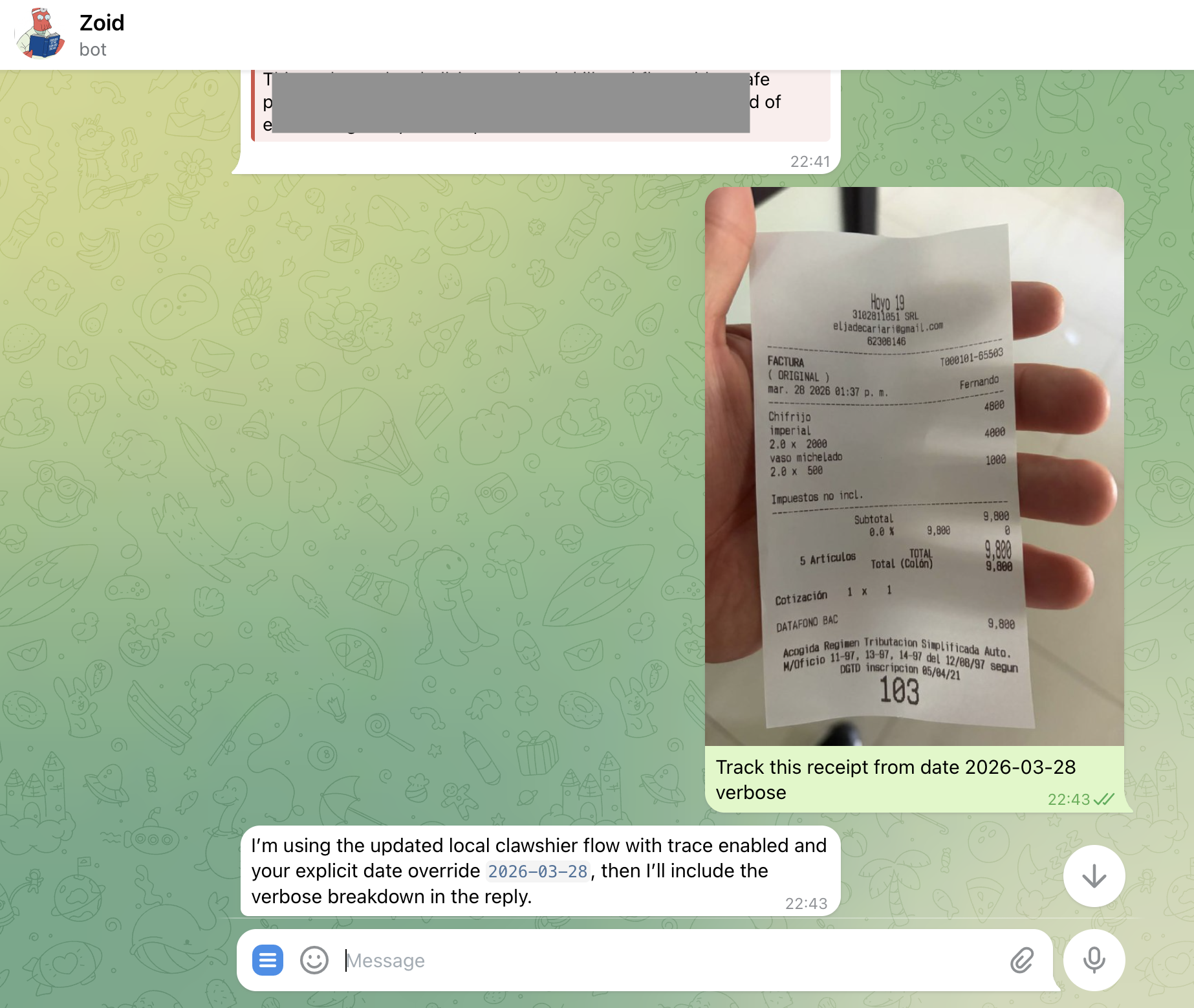
<p>Send your bot a picture of any receipt. There’s currently an issue with dates because receipts I deal with sometimes have DD-MM and MM-DD dates so image extraction sometimes mixes them up. The current workaround is to specify the date, but it’s likely not an issue if you only deal with MM-DD-YYYY dates.</p>

<p><img src="/assets/clawshier_receipt.png" alt="Clawshier receipt photo" /></p>

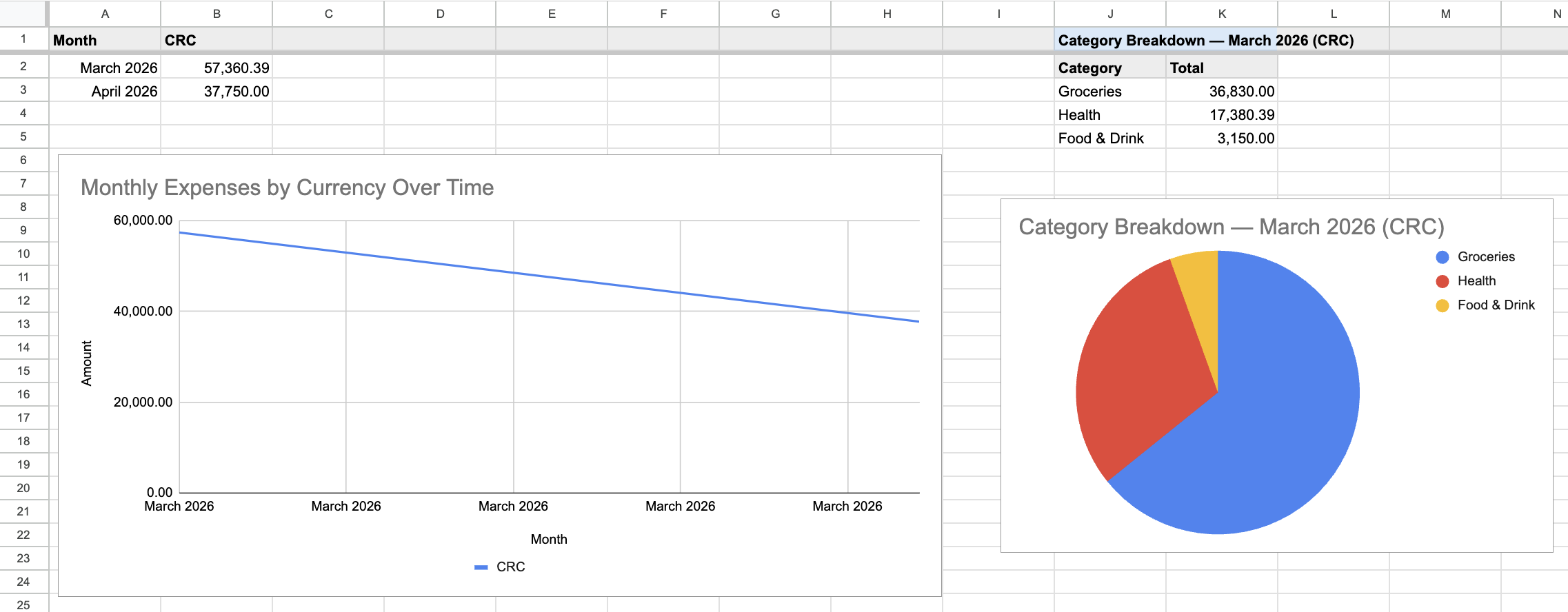
<p>Then the spreadsheets are updated with the new expense record. A few different sheets are created/updated automatically with each pipeline execution:</p>

<ul>
  <li><strong>Summary</strong>
    <ul>
      <li>Aggregated totals and charts</li>
    </ul>
  </li>
  <li><strong>Invoice Archive Breakdown</strong>
    <ul>
      <li>Breakdown of each invoice</li>
      <li>Currently very flaky data from image recognition since these are the individual line items that are tricky to read/decode even for humans</li>
    </ul>
  </li>
  <li><strong>Monthly expense sheet</strong>
    <ul>
      <li>Expenses aggregated in their corresponding MM-YY date sheet</li>
    </ul>
  </li>
</ul>

<p><img src="/assets/clawshier_summary.png" alt="Clawshier summary screenshot" /></p>

<h2 id="conclusions">Conclusions</h2>

<p>Now I’m the guy taking a picture of his receipts everywhere I go. Not a huge fan of sending these to OpenAI and would wish I could do more of this using local models, but it might help me track my “small expenses” which I struggle to keep a close eye on.</p>

<p>Also worth noting I’m not a huge fan of the DX for OpenClaw skills either, it was painful at times… I hope it’s not a “skill issue” 🥁</p>

<p>In terms of usage I’m expecting a couple dollars worth of OpenAI credits per month, we’ll see how it goes. Again local models would be able to reduce this substantially since image recognition takes up the bulk of the processing.</p>

<p>There’s plenty of ways this could be improved (i.e. PaddleOCR/Tesserect which would also avoid sending my pics to Sam). If Clawshier sounds interesting to you take a peek at the <a href="https://github.com/fdocr/clawshier">GitHub repo</a>. Pura Vida!</p>]]></content><author><name>Fernando Valverde</name><email>fernando@fdo.cr</email></author><category term="OpenClaw" /><category term="Open Claw" /><category term="OpenAI" /><category term="clawhub" /><category term="skill" /><category term="ai" /><category term="image recognition" /><category term="OCR" /><summary type="html"><![CDATA[I’ve been meaning to take a stab at this idea of automating a process to take a picture of any receipt and log it to an expenses spreadsheet. Clawshier is the OpenClaw skill that came as a result. It’s open source on GitHub and available in ClawHub.]]></summary></entry><entry><title type="html">Selfhost Timetagger on a Raspberry Pi</title><link href="https://blog.fdo.cr/selfhost-timetagger-on-a-raspberrypi" rel="alternate" type="text/html" title="Selfhost Timetagger on a Raspberry Pi" /><published>2024-04-20T16:00:00+00:00</published><updated>2024-04-20T16:00:00+00:00</updated><id>https://blog.fdo.cr/selfhost-timetagger-on-a-raspberrypi</id><content type="html" xml:base="https://blog.fdo.cr/selfhost-timetagger-on-a-raspberrypi"><![CDATA[<p>A few weeks ago I started looking into options for time tracking software. The goal is to be more aware of how I spend my time throughout the day.</p>

<blockquote>
  <p>I could selfhost something with the Raspberry Pi I have lying around the house</p>
</blockquote>

<p>The intrusive thought prevailed, so here’s a condensed/quick tutorial of how I made it work</p>

<h2 id="timetagger">Timetagger</h2>

<p>The <code class="language-plaintext highlighter-rouge">aarch64</code> architecture of the <a href="https://www.raspberrypi.com/">Raspberry Pi 4</a> I wanted to use didn’t make this straightforward. I looked for open source projects written in Python for better/easier compatibility.</p>

<p>I chose <a href="https://timetagger.app/">timetagger.app</a> (<a href="https://github.com/almarklein/timetagger">github repo</a>) and only a couple days after getting everything running I found the web app quite pleasant to use. I highly recommend it if interested in something like this.</p>

<h2 id="requirements">Requirements</h2>

<ol>
  <li>Raspberry Pi
    <ul>
      <li>4 CPU + 8GB RAM runs the project like it’s nothing so lower-end versions should also work</li>
      <li>I have a 64bit chip but installed 32bit OS (lite) because packages/tools on 64 bit OS were difficult to work with</li>
    </ul>
  </li>
  <li>A domain with DNS managed on Cloudflare
    <ul>
      <li>Tunnels will allow you access your server publicly with a subdomain</li>
    </ul>
  </li>
</ol>

<p>You’ll want to have your Raspberry Pi running in your local network. I won’t cover the basics here, so I’m assuming you can <code class="language-plaintext highlighter-rouge">ssh user@host.local</code> to your device at this point. Read <a href="https://www.raspberrypi.com/documentation/computers/getting-started.html">getting started guides</a> if needed.</p>

<h2 id="run-the-server">Run the server</h2>

<p>Timetagger has good docs and articules to help you get started with self hosting. Most of what I did I <a href="https://timetagger.app/articles/selfhost/">learned it from this article</a>. Rapid fire summary:</p>

<ol>
  <li>Ensure Python &amp; pip are installed</li>
  <li><code class="language-plaintext highlighter-rouge">python -m pip install -U timetagger</code></li>
  <li>Create a dir to keep data <code class="language-plaintext highlighter-rouge">sudo mkdir /opt/timetagger</code></li>
  <li>Change ownership (to yourself) <code class="language-plaintext highlighter-rouge">sudo chown -R [user]: /opt/timetagger/</code></li>
  <li>You can now run the server using <code class="language-plaintext highlighter-rouge">python -m timetagger</code> and you’ll want to use ENV vars:
    <ul>
      <li><code class="language-plaintext highlighter-rouge">TIMETAGGER_CREDENTIALS=XXXX</code> for username/password hash (<a href="https://timetagger.app/cred">generate here</a>)</li>
      <li><code class="language-plaintext highlighter-rouge">TIMETAGGER_LOG_LEVEL=info</code></li>
      <li><code class="language-plaintext highlighter-rouge">TIMETAGGER_BIND=0.0.0.0:8080</code></li>
      <li><code class="language-plaintext highlighter-rouge">TIMETAGGER_DATADIR=/opt/timetagger</code></li>
    </ul>
  </li>
</ol>

<p>The web app should now be reachable in your local network on <code class="language-plaintext highlighter-rouge">host.local:8080</code></p>

<h2 id="cloudflare-tunnels">Cloudflare Tunnels</h2>

<p>We want to access the app from anywhere in the world, not just from your WiFi at home.</p>

<p>Kudos to the <a href="https://pimylifeup.com/raspberry-pi-cloudflare-tunnel/">amazing tutorial from <em>pimylifeup.com</em></a> which was the source of all I know related to the use of <a href="https://developers.cloudflare.com/cloudflare-one/connections/connect-networks/">Cloudflare tunnels</a> on a Raspberry Pi. Be sure to check that one out for more details on each step below:</p>

<ol>
  <li><code class="language-plaintext highlighter-rouge">sudo apt update &amp; sudo apt upgrade</code></li>
  <li><code class="language-plaintext highlighter-rouge">sudo apt install curl lsb-release</code></li>
  <li><code class="language-plaintext highlighter-rouge">curl -L https://pkg.cloudflare.com/cloudflare-main.gpg | sudo tee /usr/share/keyrings/cloudflare-archive-keyring.gpg &gt;/dev/null</code></li>
  <li><code class="language-plaintext highlighter-rouge">echo "deb [signed-by=/usr/share/keyrings/cloudflare-archive-keyring.gpg] https://pkg.cloudflare.com/cloudflared $(lsb_release -cs) main" | sudo tee  /etc/apt/sources.list.d/cloudflared.list</code></li>
  <li><code class="language-plaintext highlighter-rouge">sudo apt update</code></li>
  <li><code class="language-plaintext highlighter-rouge">sudo apt install cloudflared</code></li>
  <li><code class="language-plaintext highlighter-rouge">cloudflared tunnel login</code></li>
  <li><code class="language-plaintext highlighter-rouge">cloudflared tunnel create TUNNELNAME</code></li>
  <li><code class="language-plaintext highlighter-rouge">cloudflared tunnel route dns TUNNELNAME DOMAINNAME</code></li>
  <li><code class="language-plaintext highlighter-rouge">cloudflared tunnel run --url localhost:8080 TUNNELNAME</code></li>
</ol>

<p>I used a subdomain under the <a href="https://fdo.cr"><code class="language-plaintext highlighter-rouge">fdo.cr</code> domain</a> that I own. You should now be able to reach the web app outside your local network!</p>

<h2 id="systemd-services">systemd services</h2>

<p>We want the server + <code class="language-plaintext highlighter-rouge">cloudflared</code> to run in the background and start on boot. For this we’ll use <code class="language-plaintext highlighter-rouge">systemd</code> and luckily <code class="language-plaintext highlighter-rouge">cloduflared</code> makes it simple:</p>

<ol>
  <li>Create a config file at <code class="language-plaintext highlighter-rouge">~/.cloudflared/config.yml</code> (example below)</li>
  <li><code class="language-plaintext highlighter-rouge">sudo cloudflared --config ~/.cloudflared/config.yml service install</code></li>
  <li><code class="language-plaintext highlighter-rouge">sudo systemctl enable cloudflared</code></li>
  <li><code class="language-plaintext highlighter-rouge">sudo systemctl start cloudflared</code></li>
</ol>

<div class="language-bash highlighter-rouge"><div class="highlight"><pre class="highlight"><code>tunnel: <span class="o">[</span>TUNNELNAME]
credentials-file: /home/[USERNAME]/.cloudflared/[UUID].json

ingress:
    - <span class="nb">hostname</span>: <span class="o">[</span>HOSTNAME]
      service: http://localhost:8080
    - service: http_status:404
</code></pre></div></div>

<p>We’ll do the same for the timetagger server (manual <code class="language-plaintext highlighter-rouge">systemd</code> setup). Start by creating <code class="language-plaintext highlighter-rouge">/user/local/bin/timetagger_boot.sh</code> (example below). I used a sleep to delay boot and added ENV vars directly, a.k.a. the easiest/laziest solution.</p>

<div class="language-bash highlighter-rouge"><div class="highlight"><pre class="highlight"><code><span class="c">#!/bin/bash</span>

<span class="nb">echo</span> <span class="s2">"Waiting 5s before startup..."</span>
<span class="nb">sleep </span>5
<span class="nb">echo</span> <span class="s2">"Starting the server!"</span>
<span class="nv">TIMETAGGER_CREDENTIALS</span><span class="o">=</span>XXXXXXXXXX <span class="se">\</span>
	<span class="nv">TIMETAGGER_LOG_LEVEL</span><span class="o">=</span>info <span class="se">\</span>
	<span class="nv">TIMETAGGER_BIND</span><span class="o">=</span>0.0.0.0:8080 <span class="se">\</span>
	<span class="nv">TIMETAGGER_DATADIR</span><span class="o">=</span>/opt/timetagger <span class="se">\</span>
	python <span class="nt">-m</span> timetagger
</code></pre></div></div>

<p>Now create <code class="language-plaintext highlighter-rouge">/etc/systemd/timetagger.service</code> (example below). Notice this example is using your user to run the service (not root).</p>

<div class="language-bash highlighter-rouge"><div class="highlight"><pre class="highlight"><code><span class="o">[</span>Unit]
<span class="nv">Description</span><span class="o">=</span>Timetagger service
<span class="nv">After</span><span class="o">=</span>network.target
<span class="nv">StartLimitIntervalSec</span><span class="o">=</span>0

<span class="o">[</span>Service]
<span class="nv">Type</span><span class="o">=</span>simple
<span class="nv">ExecStart</span><span class="o">=</span>timetagger_boot.sh
<span class="nv">Restart</span><span class="o">=</span>always
<span class="nv">RestartSec</span><span class="o">=</span>30
<span class="nv">User</span><span class="o">=[</span>USERNAME]

<span class="o">[</span>Install]
<span class="nv">WantedBy</span><span class="o">=</span>multi-user.target
</code></pre></div></div>

<p>Finally <code class="language-plaintext highlighter-rouge">systemctl daemon-reload</code> or <code class="language-plaintext highlighter-rouge">sudo reboot</code> to ensure the services are available on your public subdomain.</p>

<h2 id="performance">Performance</h2>

<p>Browsing the app (relatively <em>aggressively</em>) while looking in <code class="language-plaintext highlighter-rouge">htop</code> shows <code class="language-plaintext highlighter-rouge">0.12</code> on load average which is basically nothing. I ran a quick benchmark with <code class="language-plaintext highlighter-rouge">ab -n 10000 -c 10 https://[SUBDOMAIN].fdo.cr/timetagger/app/demo</code> and saw these results:</p>

<p><img src="/assets/timetagger_htop.png" alt="Raspberry Pi htop" title="Raspberry Pi htop" /></p>

<div class="language-bash highlighter-rouge"><div class="highlight"><pre class="highlight"><code>Document Path:          /timetagger/app/demo
Document Length:        11559 bytes

Concurrency Level:      10
Time taken <span class="k">for </span>tests:   200.090 seconds
Complete requests:      10000
Failed requests:        7
   <span class="o">(</span>Connect: 0, Receive: 0, Length: 7, Exceptions: 0<span class="o">)</span>
Total transferred:      121439275 bytes
HTML transferred:       115516711 bytes
Requests per second:    49.98 <span class="o">[</span><span class="c">#/sec] (mean)</span>
Time per request:       200.090 <span class="o">[</span>ms] <span class="o">(</span>mean<span class="o">)</span>
Time per request:       20.009 <span class="o">[</span>ms] <span class="o">(</span>mean, across all concurrent requests<span class="o">)</span>
Transfer rate:          592.70 <span class="o">[</span>Kbytes/sec] received

Connection Times <span class="o">(</span>ms<span class="o">)</span>
              min  mean[+/-sd] median   max
Connect:        0  112  56.5     97    1169
Processing:    44   87  38.4     79    1228
Waiting:       41   82  35.8     74    1227
Total:        109  200  69.7    180    1459

Percentage of the requests served within a certain <span class="nb">time</span> <span class="o">(</span>ms<span class="o">)</span>
  50%    180
  66%    196
  75%    212
  80%    225
  90%    278
  95%    329
  98%    402
  99%    458
 100%   1459 <span class="o">(</span>longest request<span class="o">)</span>
</code></pre></div></div>

<p>There are lots of caveats to note, i.e. the fact 10 concurrent users is 10x what this server will ever face, it doesn’t resemble real user behavior and follow up requests come in immediately one after the other.</p>

<p>Regardless of the caveats, a few of the noteworthy stats from the results:</p>
<ul>
  <li>The test transferred a total of 115 MB of HTML in 200s (~0.57 MB per second)</li>
  <li>Requests had a mean time of 200ms and a <code class="language-plaintext highlighter-rouge">P95</code> of 329ms</li>
  <li>Load averge on <code class="language-plaintext highlighter-rouge">htop</code> barely went over 1 (out of 4 CPUs on the device)</li>
</ul>

<p>Considering it’s running SQLite and the Python server connected publicly with a Cloudflare Tunnel (CPU hungry process) I can say the Raspberry Pi is impressively powerful.</p>

<h2 id="conclusion">Conclusion</h2>

<blockquote>
  <p>A $35-ish home server vs what a subscription service could cost per year</p>
</blockquote>

<p>I find that ^ comparison an interesting one. Proprietary SaaS offerings have delightful UI/UX and lots of extra integrations/tools, but could cost $50 or $100+ per year. Timetagger itself notably sells a <a href="https://timetagger.app/#pricing">lifetime plan for €144</a> which I would consider if I were to stop selfhosting.</p>

<p>I saw generous Free tiers but they wipe out your historic data or have some other way to hook you into subscribing. No hate intended, it’s business strategy.</p>

<p>For my needs, the OSS project I can run on my server at home will be my preferred choice.</p>

<blockquote>
  <p>A $35-ish home server vs $5-ish/month VPS</p>
</blockquote>

<p>This ^ other comparison is easily won by the Raspberry Pi home server. $60/year will get you 1 CPU (shared), 1-2GB RAM and limited SSD on a cloud provider. A Raspberry Pi has 4x those specs with large SD card storage limits if needed (30GB are plenty and cheap though).</p>

<p>You would benefit from the uptime and high bandwith + low latency connection of a datacenter when compared to your house WiFi, but that’s about it. For a hobby project this will be perfect.</p>

<p>Kudos to all the people working on OSS (and writing about it) that made this weird weekend project a reality. Also, hats off if you’ve made it this far reading and/or are willing to try this out for yourself. Pura Vida!</p>]]></content><author><name>Fernando Valverde</name><email>fernando@fdo.cr</email></author><category term="timetagger" /><category term="raspberrypi" /><category term="raspberry pi" /><category term="selfhost" /><category term="github" /><category term="open source" /><summary type="html"><![CDATA[A few weeks ago I started looking into options for time tracking software. The goal is to be more aware of how I spend my time throughout the day.]]></summary></entry><entry><title type="html">CrystalConf 2023</title><link href="https://blog.fdo.cr/crystal-conf-2023" rel="alternate" type="text/html" title="CrystalConf 2023" /><published>2023-12-06T04:00:00+00:00</published><updated>2023-12-06T04:00:00+00:00</updated><id>https://blog.fdo.cr/crystal-conf-2023</id><content type="html" xml:base="https://blog.fdo.cr/crystal-conf-2023"><![CDATA[<p>Exciting news for me: I gave a talk at <a href="https://crystal-lang.org/events/2023-crystal-berlin/">CrystalConf 2023</a>!</p>

<p>I’ve been working on an open source Battlesnake server implementation at <a href="https://github.com/fdocr/CrystalSnake"><code class="language-plaintext highlighter-rouge">fdocr/CrystalSnake</code></a> for some time now. I already shared a few blog posts about this project. Read the <a href="/background-jobs-for-kemal-in-crystal-lang">most recent one here</a> or binge through them on my <a href="https://dev.to/fdocr/series/21844">DEV Series</a>.</p>

<p>In this talk I went a bit more in depth, with beginner developers in mind too, than what I already shared in the blog posts. Watching myself on the pre-recorded session wasn’t easy for me, I hope it’s more enjoyable for everyone else though!</p>

<p>The recording is available on YouTube right here 🫡</p>

<iframe style="margin-top: 40px; margin-bottom: 40px; width: 100%; aspect-ratio: 16 / 9;" src="https://www.youtube.com/embed/yCixvVOGmNM?si=KnidMNfkb8oRr6Gg" title="YouTube video player" frameborder="0" allow="accelerometer; autoplay; clipboard-write; encrypted-media; gyroscope; picture-in-picture; web-share" allowfullscreen=""></iframe>

<p>All the talks from the conference are also available <a href="https://www.youtube.com/playlist?list=PLt-CsM4G1WoadONHl3zPN_Ts5PqH8TgMZ">in this playlist</a>. I hope to give another talk, <em>in person</em> this time, sometime soon.</p>

<p>That’s all I wanted to share for now. Pura vida!</p>]]></content><author><name>Fernando Valverde</name><email>fernando@fdo.cr</email></author><category term="Crystal" /><category term="crystal-lang" /><category term="crystal lang" /><category term="oss" /><category term="github" /><category term="open source" /><category term="conference talk" /><category term="battlesnake" /><summary type="html"><![CDATA[Exciting news for me: I gave a talk at CrystalConf 2023!]]></summary></entry><entry><title type="html">Keeping up with my cat’s 💩 using a Raspberry Pi</title><link href="https://blog.fdo.cr/keeping-up-with-my-cats-litter-box-using-a-raspberry-pi" rel="alternate" type="text/html" title="Keeping up with my cat’s 💩 using a Raspberry Pi" /><published>2023-05-23T17:00:00+00:00</published><updated>2023-05-23T17:00:00+00:00</updated><id>https://blog.fdo.cr/keeping-up-with-my-cats-litter-box-using-a-raspberry-pi</id><content type="html" xml:base="https://blog.fdo.cr/keeping-up-with-my-cats-litter-box-using-a-raspberry-pi"><![CDATA[<p>As a former dog owner and first time cat dad I was amazed at how cats are “potty trained” practically from birth. I was prepared to deal with the smell when having to clean the litter box. However, I didn’t expect their bowel movements (💩) to carry a punch that would stink up half my apartment.</p>

<p>This might not be the case for everyone, but certainly for me, with an indoor cat in a 2 bedroom apartment without a naturally ventilated place to keep her litter box.</p>

<h2 id="the-herovillain-of-the-story">The hero/villain of the story</h2>

<p>Her name is <em>Dua</em> and she is a cuddly &amp; playful rescue <a href="https://www.thesprucepets.com/tortoiseshell-cat-profile-554703">tortie cat</a>. Dua loves to play with her mouse toys and <strong>adores</strong> wet food, the latter of which is likely the reason I’m writing this post 😵‍💫</p>

<p><img src="/assets/dua.png" alt="Dua sitting on a puff sofa" /></p>

<p>I have her litter box in my second bathroom’s shower. The bathroom has an extractor fan that runs when the bathroom light is on, but she <del>refuses to</del> hasn’t figured out how to turn it on and off each time she goes #2… Annoying, right?</p>

<h2 id="automating-the-extractor-fan">Automating the extractor fan</h2>

<p>To mitigate the smell I wanted the lights to turn on when Dua goes in her litter box. To do this I put together a few things:</p>

<ul>
  <li><a href="https://www.raspberrypi.com/products/raspberry-pi-zero-w/">RaspberryPi Zero W</a>
    <ul>
      <li>WiFi support was the goal</li>
    </ul>
  </li>
  <li><a href="https://learn.adafruit.com/pir-passive-infrared-proximity-motion-sensor/how-pirs-work">PIR motion sensor</a>
    <ul>
      <li>Placed on the bathroom wall with “velcro stickers”</li>
    </ul>
  </li>
  <li>Smart switch for bathroom lights (any brand will do) paired with an Alexa</li>
  <li><a href="https://voicemonkey.io/">Voicemonkey</a> webhook to trigger an <a href="https://www.amazon.com/alexa-routines/b?ie=UTF8&amp;node=21442922011&amp;ref=hp_hub_rout">Alexa routine</a>
    <ul>
      <li><code class="language-plaintext highlighter-rouge">"Alexa, turn on the switch for 5 minutes"</code></li>
    </ul>
  </li>
</ul>

<p>The software that calls the webhook (which in turn triggers the Alexa routine) <a href="https://github.com/fdocr/pir_trigger">can be found here</a>.</p>

<h2 id="it-works">It works!</h2>

<p>Here’s what the hardware looks like in action</p>

<p><img src="/assets/pir_trigger.png" alt="RPi and motion sensor" /></p>

<center><small><i>RPi and motion sensor</i></small></center>

<p><img src="/assets/dua_pir_trigger.gif" alt="Awful quality GIF of our hero/villain" /></p>

<center><small><i>Awful quality GIF of our hero/villain</i></small></center>

<h2 id="-stats">💩 Stats</h2>

<p>With all of this in place I went a step further and added Opentelemetry to track the stats of how often the routine was being triggered on <a href="https://honeycomb.io">Honeycomb</a>.</p>

<p>I wanted to know if I was turning on the bathroom lights over false positives from the motion sensor, but after some tests it simply serves the purpose of telling how often she goes in her litter box.</p>

<p><img src="/assets/7-days-activity.png" alt="Last 7 days 💩 activity" /></p>

<center><small><i>Last 7 days 💩 activity</i></small></center>

<p><img src="/assets/24-hour-activity.png" alt="Last 24 hours 💩 activity" /></p>

<center><small><i>Last 24 hours 💩 activity</i></small></center>

<center>&nbsp;</center>

<p>Interestingly, I can tell she goes in her litter box (# of motion sensor triggers) on average ~8.5 times per day. I don’t think many cat owners can say they know this about their feline friends. I do remember and took inspiration from <a href="https://twitter.com/tenderlove/status/823341842586419200">Aaron Patterson</a> doing something similar a long time ago though.</p>

<p>Anyways, that’s it. Pura vida!</p>]]></content><author><name>Fernando Valverde</name><email>fernando@fdo.cr</email></author><category term="Raspberry Pi" /><category term="python" /><category term="automation" /><summary type="html"><![CDATA[As a former dog owner and first time cat dad I was amazed at how cats are “potty trained” practically from birth. I was prepared to deal with the smell when having to clean the litter box. However, I didn’t expect their bowel movements (💩) to carry a punch that would stink up half my apartment.]]></summary></entry><entry><title type="html">Background jobs for Kemal server in Crystal lang</title><link href="https://blog.fdo.cr/background-jobs-for-kemal-in-crystal-lang" rel="alternate" type="text/html" title="Background jobs for Kemal server in Crystal lang" /><published>2023-03-01T17:00:00+00:00</published><updated>2023-03-01T17:00:00+00:00</updated><id>https://blog.fdo.cr/background-jobs-for-kemal-in-crystal-lang</id><content type="html" xml:base="https://blog.fdo.cr/background-jobs-for-kemal-in-crystal-lang"><![CDATA[<p>Yet another post about the <a href="/learning-crystal-with-battlesnake/">Battlesnake project</a> I’ve been working on while diving in <a href="https://crystal-lang.org/">Crystal lang</a>.</p>

<p>This is a quick continuation of <a href="/database-for-kemal-server-in-crystal-lang">yesterday’s post</a> about storing data in a DB. I mentioned why I took a performance hit and the solution implemented was to persist the data to DB from a background job. The idea is that enqueuing the jobs to Redis would ideally perform better than waiting for a DB write.</p>

<p>Again, FYI the code is <a href="https://github.com/fdocr/CrystalSnake">on GitHub</a>.</p>

<h2 id="mosquito">Mosquito</h2>

<p>The Crytal Sidekiq port was a tempting option for a background task runner, but I went with <a href="https://github.com/mosquito-cr/mosquito"><code class="language-plaintext highlighter-rouge">mosquito-cr/mosquito</code></a>. My initializer looks like this:</p>

<div class="language-crystal highlighter-rouge"><div class="highlight"><pre class="highlight"><code><span class="nb">require</span> <span class="s2">"mosquito"</span>

<span class="no">Mosquito</span><span class="p">.</span><span class="nf">configure</span> <span class="k">do</span> <span class="o">|</span><span class="n">settings</span><span class="o">|</span>
  <span class="n">settings</span><span class="p">.</span><span class="nf">redis_url</span> <span class="o">=</span> <span class="p">(</span><span class="no">ENV</span><span class="p">[</span><span class="s2">"REDIS_URL"</span><span class="p">]?</span> <span class="o">||</span> <span class="s2">"redis://localhost:6379"</span><span class="p">)</span>
<span class="k">end</span>
</code></pre></div></div>

<p>Since initializers are required by <code class="language-plaintext highlighter-rouge">src/app.cr</code> (more about this <a href="/database-for-kemal-server-in-crystal-lang">on a previous post</a>) I can now enqueue the job where I once persisted directly to DB. Snippets from all of this below:</p>

<div class="language-crystal highlighter-rouge"><div class="highlight"><pre class="highlight"><code><span class="c1"># Replaces `Turn.create(...)`</span>
<span class="no">PersistTurnJob</span><span class="p">.</span><span class="nf">new</span><span class="p">(</span>
  <span class="ss">path: </span><span class="n">env</span><span class="p">.</span><span class="nf">request</span><span class="p">.</span><span class="nf">path</span><span class="p">,</span>
  <span class="ss">context_json: </span><span class="n">env</span><span class="p">.</span><span class="nf">params</span><span class="p">.</span><span class="nf">json</span><span class="p">.</span><span class="nf">to_json</span>
<span class="p">).</span><span class="nf">enqueue</span>
</code></pre></div></div>

<div class="language-crystal highlighter-rouge"><div class="highlight"><pre class="highlight"><code><span class="c1"># src/jobs/persist_turn_job.cr</span>

<span class="nb">require</span> <span class="s2">"mosquito"</span>

<span class="k">class</span> <span class="nc">PersistTurnJob</span> <span class="o">&lt;</span> <span class="no">ApplicationJob</span>
  <span class="n">params</span><span class="p">(</span><span class="n">path</span> <span class="p">:</span> <span class="no">String</span><span class="p">,</span> <span class="n">context_json</span> <span class="p">:</span> <span class="no">String</span><span class="p">)</span>

  <span class="k">def</span> <span class="nf">trace_perform</span>
    <span class="n">context</span> <span class="o">=</span> <span class="no">BattleSnake</span><span class="o">::</span><span class="no">Context</span><span class="p">.</span><span class="nf">from_json</span><span class="p">(</span><span class="n">context_json</span><span class="p">)</span>
    <span class="n">dead</span> <span class="o">=</span> <span class="n">context</span><span class="p">.</span><span class="nf">board</span><span class="p">.</span><span class="nf">snakes</span><span class="p">.</span><span class="nf">find</span> <span class="p">{</span> <span class="o">|</span><span class="n">s</span><span class="o">|</span> <span class="n">s</span><span class="p">.</span><span class="nf">id</span> <span class="o">==</span> <span class="n">context</span><span class="p">.</span><span class="nf">you</span><span class="p">.</span><span class="nf">id</span> <span class="p">}.</span><span class="nf">nil?</span>
    <span class="n">turn</span> <span class="o">=</span> <span class="no">Turn</span><span class="p">.</span><span class="nf">create</span><span class="p">(</span>
      <span class="ss">game_id: </span><span class="n">context</span><span class="p">.</span><span class="nf">game</span><span class="p">.</span><span class="nf">id</span><span class="p">,</span>
      <span class="ss">snake_id: </span><span class="n">context</span><span class="p">.</span><span class="nf">you</span><span class="p">.</span><span class="nf">id</span><span class="p">,</span>
      <span class="ss">context: </span><span class="n">context_json</span><span class="p">,</span>
      <span class="ss">path: </span><span class="n">path</span><span class="p">,</span>
      <span class="ss">dead: </span><span class="n">dead</span>
    <span class="p">)</span>
  <span class="k">end</span>
<span class="k">end</span>
</code></pre></div></div>

<p>In order to have OpenTelemetry tracing of the jobs I inherit from my <code class="language-plaintext highlighter-rouge">ApplicationJob</code>.</p>

<div class="language-crystal highlighter-rouge"><div class="highlight"><pre class="highlight"><code><span class="c1"># src/jobs/application_job.cr</span>

<span class="nb">require</span> <span class="s2">"mosquito"</span>

<span class="c1"># Base class for jobs in the app. Overrides `perform` so that jobs can</span>
<span class="c1"># implement `trace_perform` instead. This will allow for OpenTelemetry tracing</span>
<span class="c1"># if available, otherwise the job will be executed as it would if it overrides</span>
<span class="c1"># `perform` (mosquito standard). If someone does override `perform` on the job</span>
<span class="c1"># it will also have no behavior effect, other than tracing not taking place.</span>
<span class="n">abstract</span> <span class="k">class</span> <span class="nc">ApplicationJob</span> <span class="o">&lt;</span> <span class="no">Mosquito</span><span class="o">::</span><span class="no">QueuedJob</span>
  <span class="k">def</span> <span class="nf">perform</span>
    <span class="k">if</span> <span class="no">ENV</span><span class="p">[</span><span class="s2">"HONEYCOMB_API_KEY"</span><span class="p">]?.</span><span class="nf">presence</span>
      <span class="no">OpenTelemetry</span><span class="p">.</span><span class="nf">trace</span> <span class="nb">self</span><span class="p">.</span><span class="nf">class</span><span class="p">.</span><span class="nf">to_s</span> <span class="k">do</span> <span class="o">|</span><span class="n">span</span><span class="o">|</span>
        <span class="n">span</span><span class="p">.</span><span class="nf">kind</span> <span class="o">=</span> <span class="p">:</span><span class="n">internal</span>
        <span class="n">trace_perform</span>
      <span class="k">end</span>
    <span class="k">else</span>
      <span class="n">trace_perform</span>
    <span class="k">end</span>
  <span class="k">end</span>
<span class="k">end</span>
</code></pre></div></div>

<h2 id="worker">Worker</h2>

<p>Until now the app produced only one executable, which was the API server. The worker that runs these background jobs is <code class="language-plaintext highlighter-rouge">src/worker.cr</code> file and looks like this:</p>

<div class="language-crystal highlighter-rouge"><div class="highlight"><pre class="highlight"><code><span class="nb">require</span> <span class="s2">"./battle_snake/**"</span>
<span class="nb">require</span> <span class="s2">"./strategy/**"</span>

<span class="nb">require</span> <span class="s2">"dotenv"</span>
<span class="no">Dotenv</span><span class="p">.</span><span class="nf">load</span> <span class="k">if</span> <span class="no">File</span><span class="p">.</span><span class="nf">exists?</span><span class="p">(</span><span class="s2">".env"</span><span class="p">)</span>
<span class="nb">require</span> <span class="s2">"./initializers/**"</span>
<span class="nb">require</span> <span class="s2">"./models/**"</span>
<span class="nb">require</span> <span class="s2">"./jobs/**"</span>

<span class="no">Mosquito</span><span class="o">::</span><span class="no">Runner</span><span class="p">.</span><span class="nf">start</span>
</code></pre></div></div>

<p>It requires all dependencies and starts the mosquito runner, but how to work on it locally?</p>

<p>I have a <a href="https://github.com/imdrasil/sam.cr">sam.cr</a> task in place that helps me with local develpment. I tweaked <code class="language-plaintext highlighter-rouge">make sam dev</code> to spin up two <a href="https://github.com/samueleaton/sentry">Sentry</a> runners, and it continues to work seamlessly with both development executables + livereload (livecompile?) again.</p>

<h2 id="dockerfile">Dockerfile</h2>

<p>I use a Docker deployment on DigitalOcean’s App Platform (<a href="/deploy-crystal-app-with-docker-and-opentelemetry/">previous post about this</a>), so I need to change the Dockerfile so that both executables are compiled &amp; included there. This allows to execute either one from the same image passing in the command to override the default <code class="language-plaintext highlighter-rouge">ENTRYPOINT</code> (<a href="https://docs.docker.com/engine/reference/builder/#entrypoint">reference</a>).</p>

<p>It now looks like this:</p>

<div class="language-crystal highlighter-rouge"><div class="highlight"><pre class="highlight"><code><span class="c1"># Build image</span>
<span class="no">FROM</span> <span class="n">crystallang</span><span class="o">/</span><span class="n">crystal</span><span class="p">:</span><span class="mf">1.7</span><span class="o">.</span><span class="mi">2</span><span class="o">-</span><span class="n">alpine</span> <span class="k">as</span> <span class="n">builder</span>
<span class="no">WORKDIR</span> <span class="sr">/opt
# Cache dependencies
COPY ./s</span><span class="n">hard</span><span class="p">.</span><span class="nf">yml</span> <span class="p">.</span><span class="nf">/</span><span class="n">shard</span><span class="p">.</span><span class="nf">lock</span> <span class="sr">/opt/</span>
<span class="no">RUN</span> <span class="n">shards</span> <span class="n">install</span> <span class="o">-</span><span class="n">v</span>
<span class="c1"># Build a binary</span>
<span class="no">COPY</span> <span class="p">.</span> <span class="nf">/</span><span class="n">opt</span><span class="o">/</span>
<span class="no">RUN</span> <span class="n">crystal</span> <span class="n">build</span> <span class="o">--</span><span class="n">static</span> <span class="o">--</span><span class="n">release</span> <span class="p">.</span><span class="nf">/</span><span class="n">src</span><span class="o">/</span><span class="n">app</span><span class="p">.</span><span class="nf">cr</span>
<span class="no">RUN</span> <span class="n">crystal</span> <span class="n">build</span> <span class="o">--</span><span class="n">static</span> <span class="o">--</span><span class="n">release</span> <span class="p">.</span><span class="nf">/</span><span class="n">src</span><span class="o">/</span><span class="n">worker</span><span class="p">.</span><span class="nf">cr</span>
<span class="no">RUN</span> <span class="n">crystal</span> <span class="n">build</span> <span class="o">--</span><span class="n">static</span> <span class="o">--</span><span class="n">release</span> <span class="p">.</span><span class="nf">/</span><span class="n">src</span><span class="o">/</span><span class="n">money_hack</span><span class="p">.</span><span class="nf">cr</span>
<span class="c1"># ===============</span>
<span class="c1"># Result image with one layer</span>
<span class="no">FROM</span> <span class="n">alpine</span><span class="ss">:latest</span>
<span class="no">WORKDIR</span> <span class="o">/</span>
<span class="no">COPY</span> <span class="o">--</span><span class="n">from</span><span class="o">=</span><span class="n">builder</span> <span class="sr">/opt/</span><span class="n">app</span> <span class="o">.</span>
<span class="no">COPY</span> <span class="o">--</span><span class="n">from</span><span class="o">=</span><span class="n">builder</span> <span class="sr">/opt/</span><span class="n">worker</span> <span class="o">.</span>
<span class="no">COPY</span> <span class="o">--</span><span class="n">from</span><span class="o">=</span><span class="n">builder</span> <span class="sr">/opt/mone</span><span class="n">y_hack</span> <span class="o">.</span>
<span class="no">ENTRYPOINT</span> <span class="p">[</span><span class="s2">"./money_hack"</span><span class="p">]</span>
</code></pre></div></div>

<p>It’s now compiling <code class="language-plaintext highlighter-rouge">src/app.cr</code>, <code class="language-plaintext highlighter-rouge">src/worker.cr</code>, and… <code class="language-plaintext highlighter-rouge">src/money_hack.cr</code>? Well, I already mentioned I’m not trying to spend more money than needed on this project.</p>

<p>My solution was to run both the server and the worker on the same node/droplet. There are many disadvantages to this so I don’t recommend this practice as a rule of thumb (hence the name <code class="language-plaintext highlighter-rouge">src/money_hack.cr</code>). Managing this with Kemal/Mosquito configs or independent horizontal scaling as needed are likely better solutions.</p>

<div class="language-crystal highlighter-rouge"><div class="highlight"><pre class="highlight"><code><span class="c1">#! /usr/bin/env crystal</span>
<span class="c1">#</span>
<span class="c1"># Runs both the server and worker executables in separate fibers to avoid</span>
<span class="c1"># independent deployments. Motivation is saving costs</span>
<span class="c1">#</span>

<span class="n">channel</span> <span class="o">=</span> <span class="no">Channel</span><span class="p">(</span><span class="no">Nil</span><span class="p">).</span><span class="nf">new</span>

<span class="n">spawns</span> <span class="o">=</span> <span class="p">[</span><span class="s2">"./app -p 8080"</span><span class="p">,</span> <span class="s2">"./worker"</span><span class="p">].</span><span class="nf">map</span> <span class="k">do</span> <span class="o">|</span><span class="n">command</span><span class="o">|</span>
  <span class="n">spawn</span> <span class="k">do</span>
    <span class="n">res</span> <span class="o">=</span> <span class="nb">system</span> <span class="n">command</span>
    <span class="n">channel</span><span class="p">.</span><span class="nf">send</span><span class="p">(</span><span class="kp">nil</span><span class="p">)</span> <span class="k">unless</span> <span class="n">res</span>
  <span class="k">end</span>
<span class="k">end</span>

<span class="n">channel</span><span class="p">.</span><span class="nf">receive</span>
</code></pre></div></div>

<h2 id="resource-consumption--performance">Resource consumption &amp; performance</h2>

<p>First of all, there’s now two executables running on the same droplet that used to only run the API server. These are the insights of the small instance running <code class="language-plaintext highlighter-rouge">512 MB RAM | 1 vCPU x 1</code> (last 7 days).</p>

<p><img src="/assets/snake_resource_consumption.png" alt="Snake resource consumption graph" /></p>

<p>I marked in red the (approximate) regions to explain them better.</p>

<table>
  <thead>
    <tr>
      <th>Region</th>
      <th>Memory average</th>
      <th>CPU average</th>
      <th>Notes</th>
    </tr>
  </thead>
  <tbody>
    <tr>
      <td>1</td>
      <td>13%</td>
      <td>0%-1%</td>
      <td>Pre-data persistance (no DB)</td>
    </tr>
    <tr>
      <td>2</td>
      <td>variable</td>
      <td>variable</td>
      <td>development (debug/errors/deployments)</td>
    </tr>
    <tr>
      <td>3</td>
      <td>13%</td>
      <td>1%-2%</td>
      <td>sync DB persistance (<a href="/database-for-kemal-server-in-crystal-lang">prev post</a>)</td>
    </tr>
    <tr>
      <td>4</td>
      <td>variable</td>
      <td>variable</td>
      <td>development (debug/errors/deployments)</td>
    </tr>
    <tr>
      <td>5</td>
      <td>16%</td>
      <td>1%-2%</td>
      <td>Background job persistance</td>
    </tr>
  </tbody>
</table>

<p>In region 1 there’s ~13% memory usage and that remains unchanged during region 3. With the worker processing jobs region 4 did consume ~16% memory, which is very little difference IMO. CPU usage in region 1 was 0% and 1% at times (5min granularity). With both persitance implementations on region 3 and 5 it bumped up to 1% and 2% values.</p>

<p>All of this tells me that we could (in theory) refactor <code class="language-plaintext highlighter-rouge">money_hack.cr</code> to have many workers in parallel before getting close to maxing out the hardware capabilities. Definitely not necessary for now, specially since the bottleneck is DB/Redis hardware. Just a funny situation to think about.</p>

<h2 id="telemetry-comparison">Telemetry comparison</h2>

<p>The <code class="language-plaintext highlighter-rouge">COUNT</code>, <code class="language-plaintext highlighter-rouge">P50</code>, <code class="language-plaintext highlighter-rouge">P95</code>, and <code class="language-plaintext highlighter-rouge">P99</code> of traces across the last few days below</p>

<p><strong>BEFORE DB PERSISTANCE</strong></p>

<p><img src="/assets/without_db_server_times.png" alt="Server times before DB persist implemented" /></p>

<p><strong>SYNC DB PERSISTANCE</strong></p>

<p><img src="/assets/db_sync_server_times.png" alt="Server times with DB persist implemented" /></p>

<p><strong>ASYNC WORKER DB PERSISTANCE</strong></p>

<p><img src="/assets/mosquito_jobs_server_times.png" alt="Server times with background job implemented" /></p>

<p>That’s great! ~2x better in <code class="language-plaintext highlighter-rouge">P50</code>, ~2.5x better in <code class="language-plaintext highlighter-rouge">P95</code>, and ~5x better in <code class="language-plaintext highlighter-rouge">P99</code>. Nothing compares to raw Crystal code execution with sub-millisecond response times, but this isn’t bad in any way considering we have everything integrated in the project.</p>

<p>Below is the telemetry on the job execution too. An alternative would be aggregating/querying logs I guess, but with the existing integration it’s an easy way to measure them too.</p>

<p><img src="/assets/mosquito_jobs_worker_times.png" alt="Background job times" /></p>

<p>It makes sense to see the jobs perform similar to the <em>sync DB persistance</em> telemetry data. Reassures the assumption (widely known/used approach) that DB requests are slower than Redis in this scenario.</p>

<h2 id="conclusions">Conclusions</h2>

<p>The app is starting to look sturdy to me, as in there are a few moving pieces now and it performs nicely (fast and reliable). It’s also a joy to work with Crystal code.</p>

<p>I have one more post in mind for the series, at least for a while, so I’m excited about sharing that sometime soon.</p>

<p>Pura vida.</p>]]></content><author><name>Fernando Valverde</name><email>fernando@fdo.cr</email></author><category term="Crystal" /><category term="crystal-lang" /><category term="crystal lang" /><category term="oss" /><category term="github" /><category term="open source" /><category term="background worker" /><category term="mosquito" /><category term="background job" /><summary type="html"><![CDATA[Yet another post about the Battlesnake project I’ve been working on while diving in Crystal lang.]]></summary></entry><entry><title type="html">Database for Kemal server in Crystal lang</title><link href="https://blog.fdo.cr/database-for-kemal-server-in-crystal-lang" rel="alternate" type="text/html" title="Database for Kemal server in Crystal lang" /><published>2023-02-28T21:00:00+00:00</published><updated>2023-02-28T21:00:00+00:00</updated><id>https://blog.fdo.cr/database-for-kemal-server-in-crystal-lang</id><content type="html" xml:base="https://blog.fdo.cr/database-for-kemal-server-in-crystal-lang"><![CDATA[<p>This is another post about the <a href="/learning-crystal-with-battlesnake/">Battlesnake project</a> I’ve been working on while diving in <a href="https://crystal-lang.org/">Crystal lang</a>.</p>

<p>This time I’m looking into persisting the game data to a database for analysis. This will allow me to review games from each game played by the bot and hopefully improve my spot on the leaderboards by tweaking my strategy.</p>

<p>FYI the code is <a href="https://github.com/fdocr/CrystalSnake">on GitHub</a>.</p>

<h2 id="jennifercr">Jennifer.cr</h2>

<p><a href="https://github.com/imdrasil/jennifer.cr"><code class="language-plaintext highlighter-rouge">imdrasil/jennifer.cr</code></a> is my ORM of choice, but I’m no longer following the recommended <code class="language-plaintext highlighter-rouge">config</code> directory in the root of the project. I’m just stuffing initializers to be required from the main app files (i.e. <code class="language-plaintext highlighter-rouge">src/app.cr</code>).</p>

<p>This is what the database initializer can look like:</p>

<div class="language-crystal highlighter-rouge"><div class="highlight"><pre class="highlight"><code><span class="c1"># src/initializers/database.cr</span>

<span class="nb">require</span> <span class="s2">"kemal"</span>
<span class="nb">require</span> <span class="s2">"jennifer"</span>
<span class="nb">require</span> <span class="s2">"jennifer/adapter/postgres"</span>

<span class="no">Jennifer</span><span class="o">::</span><span class="no">Config</span><span class="p">.</span><span class="nf">configure</span> <span class="k">do</span> <span class="o">|</span><span class="n">conf</span><span class="o">|</span>
  <span class="n">conf</span><span class="p">.</span><span class="nf">from_uri</span><span class="p">(</span><span class="no">ENV</span><span class="p">[</span><span class="s2">"DATABASE_URL"</span><span class="p">])</span> <span class="k">if</span> <span class="no">ENV</span><span class="p">.</span><span class="nf">has_key?</span><span class="p">(</span><span class="s2">"DATABASE_URL"</span><span class="p">)</span>
  <span class="n">conf</span><span class="p">.</span><span class="nf">logger</span><span class="p">.</span><span class="nf">level</span> <span class="o">=</span> <span class="no">Log</span><span class="o">::</span><span class="no">Severity</span><span class="o">::</span><span class="no">Debug</span>
  <span class="n">conf</span><span class="p">.</span><span class="nf">adapter</span> <span class="o">=</span> <span class="s2">"postgres"</span>
  <span class="n">conf</span><span class="p">.</span><span class="nf">pool_size</span> <span class="o">=</span> <span class="p">(</span><span class="no">ENV</span><span class="p">[</span><span class="s2">"DB_POOL"</span><span class="p">]</span> <span class="o">||=</span> <span class="s2">"5"</span><span class="p">).</span><span class="nf">to_i</span>
<span class="k">end</span>
</code></pre></div></div>

<p><a href="https://imdrasil.github.io/jennifer.cr/docs/">Jennifer docs</a> are great. I found a couple of difficulties along the way, mostly related to configuration details, but made it work with help from kind folks on GitHub.</p>

<h2 id="migration--model">Migration &amp; Model</h2>

<p>It’s not quite like ActiveRecord (maybe nothing is/will be 😅), but IMO it’s great and has lots of incredibly valuable features (i.e. built in migration management, query dsl, etc). Here’s what the migration and model look like:</p>

<div class="language-crystal highlighter-rouge"><div class="highlight"><pre class="highlight"><code><span class="k">class</span> <span class="nc">CreateTurns</span> <span class="o">&lt;</span> <span class="no">Jennifer</span><span class="o">::</span><span class="no">Migration</span><span class="o">::</span><span class="no">Base</span>
  <span class="k">def</span> <span class="nf">up</span>
    <span class="n">create_table</span> <span class="ss">:turns</span> <span class="k">do</span> <span class="o">|</span><span class="n">t</span><span class="o">|</span>
      <span class="n">t</span><span class="p">.</span><span class="nf">string</span> <span class="ss">:game_id</span><span class="p">,</span> <span class="p">{</span><span class="ss">:null</span> <span class="o">=&gt;</span> <span class="kp">false</span><span class="p">}</span>
      <span class="n">t</span><span class="p">.</span><span class="nf">string</span> <span class="ss">:snake_id</span><span class="p">,</span> <span class="p">{</span><span class="ss">:null</span> <span class="o">=&gt;</span> <span class="kp">false</span><span class="p">}</span>
      <span class="n">t</span><span class="p">.</span><span class="nf">text</span> <span class="ss">:context</span><span class="p">,</span> <span class="p">{</span><span class="ss">:null</span> <span class="o">=&gt;</span> <span class="kp">false</span><span class="p">}</span>
      <span class="n">t</span><span class="p">.</span><span class="nf">string</span> <span class="ss">:path</span><span class="p">,</span> <span class="p">{</span><span class="ss">:null</span> <span class="o">=&gt;</span> <span class="kp">false</span><span class="p">}</span>
      <span class="n">t</span><span class="p">.</span><span class="nf">bool</span> <span class="ss">:dead</span><span class="p">,</span> <span class="p">{</span><span class="ss">:null</span> <span class="o">=&gt;</span> <span class="kp">false</span><span class="p">,</span> <span class="ss">:default</span> <span class="o">=&gt;</span> <span class="kp">false</span><span class="p">}</span>

      <span class="n">t</span><span class="p">.</span><span class="nf">index</span> <span class="ss">:game_id</span>
      <span class="n">t</span><span class="p">.</span><span class="nf">index</span> <span class="ss">:path</span>

      <span class="n">t</span><span class="p">.</span><span class="nf">timestamps</span>
    <span class="k">end</span>
  <span class="k">end</span>

  <span class="k">def</span> <span class="nf">down</span>
    <span class="n">drop_table</span> <span class="ss">:turns</span> <span class="k">if</span> <span class="n">table_exists?</span> <span class="ss">:turns</span>
  <span class="k">end</span>
<span class="k">end</span>
</code></pre></div></div>

<div class="language-crystal highlighter-rouge"><div class="highlight"><pre class="highlight"><code><span class="c1"># This is a DB record representation of a request from a game for either</span>
<span class="c1"># start/move/end request.</span>
<span class="c1"># </span>
<span class="c1"># NOTE: https://imdrasil.github.io/jennifer.cr/docs/model_mapping</span>
<span class="k">class</span> <span class="nc">Turn</span> <span class="o">&lt;</span> <span class="no">Jennifer</span><span class="o">::</span><span class="no">Model</span><span class="o">::</span><span class="no">Base</span>
  <span class="n">with_timestamps</span>

  <span class="n">mapping</span><span class="p">(</span>
    <span class="ss">id: </span><span class="no">Primary64</span><span class="p">,</span>
    <span class="ss">game_id: </span><span class="no">String</span><span class="p">,</span>
    <span class="ss">snake_id: </span><span class="no">String</span><span class="p">,</span>
    <span class="ss">context: </span><span class="no">String</span><span class="p">,</span>
    <span class="ss">path: </span><span class="no">String</span><span class="p">,</span>
    <span class="ss">dead: </span><span class="no">Bool</span><span class="p">,</span>
    <span class="ss">created_at: </span><span class="no">Time</span><span class="p">?,</span>
    <span class="ss">updated_at: </span><span class="no">Time</span><span class="p">?,</span>
  <span class="p">)</span>
<span class="k">end</span>
</code></pre></div></div>

<p>With all of this in place I added this macro to <code class="language-plaintext highlighter-rouge">src/app.cr</code> and called it from within <code class="language-plaintext highlighter-rouge">/start</code>, <code class="language-plaintext highlighter-rouge">/move</code>, <code class="language-plaintext highlighter-rouge">/end</code> endpoints so the turn data gets persisted in Postgres.</p>

<div class="language-crystal highlighter-rouge"><div class="highlight"><pre class="highlight"><code><span class="k">macro</span> <span class="nf">persist_turn!</span>
  <span class="n">dead</span> <span class="o">=</span> <span class="n">context</span><span class="p">.</span><span class="nf">board</span><span class="p">.</span><span class="nf">snakes</span><span class="p">.</span><span class="nf">find</span> <span class="p">{</span> <span class="o">|</span><span class="n">s</span><span class="o">|</span> <span class="n">s</span><span class="p">.</span><span class="nf">id</span> <span class="o">==</span> <span class="n">context</span><span class="p">.</span><span class="nf">you</span><span class="p">.</span><span class="nf">id</span> <span class="p">}.</span><span class="nf">nil?</span>
  <span class="no">Turn</span><span class="p">.</span><span class="nf">create</span><span class="p">(</span>
    <span class="ss">game_id: </span><span class="n">context</span><span class="p">.</span><span class="nf">game</span><span class="p">.</span><span class="nf">id</span><span class="p">,</span>
    <span class="ss">snake_id: </span><span class="n">context</span><span class="p">.</span><span class="nf">you</span><span class="p">.</span><span class="nf">id</span><span class="p">,</span>
    <span class="ss">context: </span><span class="n">env</span><span class="p">.</span><span class="nf">params</span><span class="p">.</span><span class="nf">json</span><span class="p">.</span><span class="nf">to_json</span><span class="p">,</span>
    <span class="ss">path: </span><span class="n">env</span><span class="p">.</span><span class="nf">request</span><span class="p">.</span><span class="nf">path</span><span class="p">,</span>
    <span class="ss">dead: </span><span class="n">dead</span>
  <span class="p">)</span>
<span class="k">end</span>
</code></pre></div></div>

<p>I left this run through Monday’s leaderboard matches and it worked. You can check out the most recent games persisted by my snake in <a href="https://snake.fdo.cr/games"><code class="language-plaintext highlighter-rouge">https://snake.fdo.cr/games</code></a></p>

<h2 id="performance-impact">Performance impact</h2>

<p>Now that we’re storing (inserting) data to PostgreSQL, which is currently hosted in a low cost server, response times should’ve slowed down a noticeable amount.</p>

<p><a href="https://opentelemetry.io/">OpenTelemetry</a> data on <a href="https://www.honeycomb.io/">Honeycomb</a> is able to tell me exactly how it performed (read <a href="/deploy-crystal-app-with-docker-and-opentelemetry/">my post about this here</a>).</p>

<p><strong>BEFORE</strong></p>

<p><img src="/assets/without_db_server_times.png" alt="Server times before DB persist implemented" /></p>

<p><strong>AFTER</strong></p>

<p><img src="/assets/db_sync_server_times.png" alt="Server times with DB persist implemented" /></p>

<p>There’s indeed a penalty in persisting data, likely coming from network latency and the low cost DB server performance being much lower than ideal… I’m saving $$ with that pet (as in <a href="https://traefik.io/blog/pets-vs-cattle-the-future-of-kubernetes-in-2022/">“not caddle”</a>) server (droplet on <a href="https://www.digitalocean.com/">DO</a>) hosting Redis+Postgres maintained by me. This hack saves me ~$25/month and could merit a post in and of itself 😆</p>

<p>Anyways, Battlesnake rules usually work with a <code class="language-plaintext highlighter-rouge">500ms</code> timeout, which means we have time to spare for now.</p>

<h2 id="how-to-recoverregain-performance">How to recover/regain performance</h2>

<p>I’m not going to start spending money on high performing tiers of hosted Postgres services anytime soon, so I could think of ways to avoid such a costly penatly. One option is to store the <code class="language-plaintext highlighter-rouge">Turn</code> data asynchronously.</p>

<p>Redis is better performing than Postgres, so queuing the data to be persisted to DB by a background job instead of synchronously when the request is made might help improve response times again.</p>

<p>I actually already have this implemented with the <a href="https://github.com/mosquito-cr/mosquito">mosquito shard</a>, but that will be covered in the next post of this series. I’m waiting for at least a day’s worth of leaderboard match data to reliably compare with the results above, so stay tuned if interested I guess.</p>

<p>Pura vida.</p>]]></content><author><name>Fernando Valverde</name><email>fernando@fdo.cr</email></author><category term="Crystal" /><category term="crystal-lang" /><category term="crystal lang" /><category term="oss" /><category term="github" /><category term="open source" /><category term="database" /><category term="jennifer.cr" /><category term="worker" /><category term="kemal" /><summary type="html"><![CDATA[This is another post about the Battlesnake project I’ve been working on while diving in Crystal lang.]]></summary></entry><entry><title type="html">Algorithms and standard library modules in my Battlesnake</title><link href="https://blog.fdo.cr/algorithms-and-crystal-standard-library-modules-in-my-battlesnake/" rel="alternate" type="text/html" title="Algorithms and standard library modules in my Battlesnake" /><published>2023-02-22T18:00:00+00:00</published><updated>2023-02-22T18:00:00+00:00</updated><id>https://blog.fdo.cr/algorithms-and-standard-library-modules-in-my-battlesnake</id><content type="html" xml:base="https://blog.fdo.cr/algorithms-and-crystal-standard-library-modules-in-my-battlesnake/"><![CDATA[<p>The <a href="/learning-crystal-with-battlesnake/">first post</a> in the series <em>walked through</em> the code of my current strategy. This one will share a few of the learnings from writing the utility algorithms in the project (as examples for) where I used Crystal’s standard library modules.</p>

<h2 id="parsing-json-in-crystal">Parsing JSON in Crystal</h2>

<p>This is a common task that has to be dealt with on every language. Crystal provides the <code class="language-plaintext highlighter-rouge">JSON::Serializable</code> module for you to include in your class. That way you get <code class="language-plaintext highlighter-rouge">to_json</code> and <code class="language-plaintext highlighter-rouge">from_json</code> methods based on properties &amp; annotations. The <a href="https://crystal-lang.org/api/1.7.2/JSON/Serializable.html#usage">module’s usage instructions (docs)</a> are great.</p>

<p>It might be cumbersome to work through a nested object hierarchy when first setting it up, but it’s pretty neat to parse Battlesnake’s context and then work with all objects (i.e. <code class="language-plaintext highlighter-rouge">@context.board.snakes.head</code>, <code class="language-plaintext highlighter-rouge">@context.board.width</code>, etc). Pretty neat to have instant feedback against typos when working with these thanks to the compiler thereafter too.</p>

<p>The classes in the <a href="https://github.com/fdocr/CrystalSnake/tree/main/src/battle_snake"><code class="language-plaintext highlighter-rouge">/src/battle_snake</code> directory</a> are the representation of the game that comes in as JSON payload on each turn.</p>

<h2 id="a-search-algorithm">A* Search Algorithm</h2>

<p><code class="language-plaintext highlighter-rouge">a_star.cr</code> is the utility method (<a href="https://fdocr.github.io/CrystalSnake/Strategy/Utils.html#a_star%28a%3ABattleSnake%3A%3APoint%2Cb%3ABattleSnake%3A%3APoint%2Ccontext%3ABattleSnake%3A%3AContext%29-class-method">docs reference</a>) that will find the shortest path from a point A to a point B. In this context, a point is a <code class="language-plaintext highlighter-rouge">BattleSnake::Point</code> that represents a coordinate <code class="language-plaintext highlighter-rouge">(x, y)</code> on the board.</p>

<blockquote>
  <p>The history and how it works is explained <a href="https://en.wikipedia.org/wiki/A*_search_algorithm">in wikipedia</a>. My implementation <a href="https://github.com/fdocr/CrystalSnake/blob/main/src/strategy/utils/a_star.cr">is on GitHub (here)</a>.</p>
</blockquote>

<p>I’m sure there are potential optimizations, but I did my best to make it efficient with things like using the recommended priority queue data structure with <a href="https://github.com/spider-gazelle/priority-queue"><code class="language-plaintext highlighter-rouge">spider-gazelle/priority-queue</code></a>. After all the server needs to respond quick (<code class="language-plaintext highlighter-rouge">&lt;500ms</code>) for it to play the game and we need to trust we can call utility methods many times on a single turn to make a decision.</p>

<h2 id="comparing-points-distance">Comparing points (distance)</h2>

<p>In order to compare and sort custom classes on data structures Crystal provides the <a href="https://crystal-lang.org/api/1.7.2/Comparable.html"><code class="language-plaintext highlighter-rouge">Comparable</code> module/mixin</a>. The formula to know the distance between two <code class="language-plaintext highlighter-rouge">BattleSnake::Point</code> looks like this (<a href="https://github.com/fdocr/CrystalSnake/blob/main/src/battle_snake/point.cr">class code here</a>):</p>

<div class="language-crystal highlighter-rouge"><div class="highlight"><pre class="highlight"><code><span class="k">def</span> <span class="nf">&lt;</span><span class="o">=&gt;</span><span class="p">(</span><span class="n">other</span> <span class="p">:</span> <span class="no">Point</span><span class="p">)</span>
  <span class="p">(</span><span class="n">x</span> <span class="o">-</span> <span class="n">other</span><span class="p">.</span><span class="nf">x</span><span class="p">).</span><span class="nf">abs</span> <span class="o">+</span> <span class="p">(</span><span class="n">y</span> <span class="o">-</span> <span class="n">other</span><span class="p">.</span><span class="nf">y</span><span class="p">).</span><span class="nf">abs</span>
<span class="k">end</span>
</code></pre></div></div>

<p>Known as Manhattan distance and by a few other names, this is the basis of how we can tell how far away two points are from each other. This is key in being able to implement A* on a board, which could be thought of as a graph with equal distance (1) from each node.</p>

<p>Now our class automatically gets the conventional comparison operators (<code class="language-plaintext highlighter-rouge">&lt;</code>, <code class="language-plaintext highlighter-rouge">&lt;=</code>, <code class="language-plaintext highlighter-rouge">==</code>, <code class="language-plaintext highlighter-rouge">&gt;=</code>, and <code class="language-plaintext highlighter-rouge">&gt;</code>) populated based off it and data structures like arrays <a href="https://crystal-lang.org/api/1.7.2/Array.html#sort%3AArray%28T%29-instance-method">can sort them</a> too.</p>

<h2 id="flood-fill">Flood fill</h2>

<p>This is an algorithm that determines all the possible area that can be reached, as oppossed to what all the empty points on the board because a section might be blocked off and unreachable (<a href="https://fdocr.github.io/CrystalSnake/Strategy/Utils.html#flood_fill%28a%3ABattleSnake%3A%3APoint%2Ccontext%3ABattleSnake%3A%3AContext%29-class-method">docs reference</a>).</p>

<p>My own (summarized) way of explaining it would be <em>“an iterative processing of all valid nearby spaces”</em>.</p>

<blockquote>
  <p>More about flood fill <a href="https://en.wikipedia.org/wiki/Flood_fill">on wikipedia</a>. My implementation is <a href="https://github.com/fdocr/CrystalSnake/blob/main/src/strategy/utils/flood_fill.cr">on GitHub (here)</a>.</p>
</blockquote>

<p>This comes in handy when making a decision between different valid moves on a strategy. Consider if you had to choose bewteen <em>(a)</em> move to the right and end up with a flood fill area of 3, or <em>(b)</em> move to the left and end up with a flood fill area of 12. Option <em>(a)</em> sounds like the best one.</p>

<p>That’s how <code class="language-plaintext highlighter-rouge">CautiousCarol</code> decides to take a left instead of running into an enclosed area (dead end): By calculating what those flood fill results are and picking the largest one.</p>

<h2 id="conclusions">Conclusions</h2>

<p>There are other modules/mixins that can be included or used to extend classes (i.e. <a href="https://crystal-lang.org/api/1.7.2/Enumerable.html">Enumerable</a>), so these are just two situations applied to this specific project.</p>

<p>I had flashbacks to university memories when working on these. Nostalgic and fun. The cool thing is that now every new strategy I can work on will be able to use any of these if need be.</p>

<p>Kudos to the BattleSnake team for the resources they upload, like the <a href="https://www.youtube.com/watch?v=XyptXbHxZ0w&amp;t=2918s">Deep Learning: Useful Battlesnake Algorithms
</a> YouTube video, where I learned a lot about how these and other algorithms can be applied in BattleSnake.</p>

<p>Pura vida.</p>]]></content><author><name>Fernando Valverde</name><email>fernando@fdo.cr</email></author><category term="Crystal" /><category term="crystal-lang" /><category term="crystal lang" /><category term="oss" /><category term="github" /><category term="open source" /><category term="algorithm" /><category term="search algorithm" /><category term="data structures" /><summary type="html"><![CDATA[The first post in the series walked through the code of my current strategy. This one will share a few of the learnings from writing the utility algorithms in the project (as examples for) where I used Crystal’s standard library modules.]]></summary></entry><entry><title type="html">Documenting a Crystal open source project</title><link href="https://blog.fdo.cr/documenting-a-crystal-open-source-project/" rel="alternate" type="text/html" title="Documenting a Crystal open source project" /><published>2023-02-21T00:00:00+00:00</published><updated>2023-02-21T00:00:00+00:00</updated><id>https://blog.fdo.cr/documenting-a-crystal-open-source-project</id><content type="html" xml:base="https://blog.fdo.cr/documenting-a-crystal-open-source-project/"><![CDATA[<p>This post is a quick overview of how Crystal lang built-in documentation features work and an easy setup to host them for free for Open Source projects. A compilation of things I’ve seen across Crystal repos and applied on mine.</p>

<h2 id="documenting-code">Documenting code</h2>

<p>Crystal maintains a <code class="language-plaintext highlighter-rouge">crystal docs</code> command that processes your project’s codebase and exports a website with the README &amp; inline comments. IMO it’s awesome to encourage documentation to live within the codebase itself.</p>

<p>The generated site will reference/link files (i.e. <code class="language-plaintext highlighter-rouge">Module::Class</code> mentions are automatically resolved and converted into links to the respective feature), Admonitions (i.e. support for <code class="language-plaintext highlighter-rouge">NOTE</code>, <code class="language-plaintext highlighter-rouge">TODO</code>, etc notes), Inheriting Documentation (based on class inheritance), amongst others.</p>

<p><a href="https://crystal-lang.org/reference/1.7/syntax_and_semantics/documenting_code.html">Official Crystal documenting code guide</a></p>

<h2 id="github-actions--github-pages">GitHub Actions ➡ GitHub Pages</h2>

<p>Automating becomes possible when putting GitHub actions &amp; pages together, something I jumped into as soon as I realized it would be cool to ensure the docs are always up-to-date with the <code class="language-plaintext highlighter-rouge">main</code> branch. Here’s what my <code class="language-plaintext highlighter-rouge">docs.yml</code> GitHub action looks like:</p>

<div class="language-yaml highlighter-rouge"><div class="highlight"><pre class="highlight"><code><span class="na">name</span><span class="pi">:</span> <span class="s">Upload docs</span>
<span class="na">on</span><span class="pi">:</span>
  <span class="na">push</span><span class="pi">:</span>
    <span class="na">branches</span><span class="pi">:</span> <span class="pi">[</span><span class="nv">main</span><span class="pi">]</span>
<span class="na">permissions</span><span class="pi">:</span>
  <span class="na">contents</span><span class="pi">:</span> <span class="s">write</span>
<span class="na">jobs</span><span class="pi">:</span>
  <span class="na">build-and-deploy</span><span class="pi">:</span>
    <span class="na">runs-on</span><span class="pi">:</span> <span class="s">ubuntu-latest</span>
    <span class="na">steps</span><span class="pi">:</span>
      <span class="pi">-</span> <span class="na">name</span><span class="pi">:</span> <span class="s">Checkout 🛎️</span>
        <span class="na">uses</span><span class="pi">:</span> <span class="s">actions/checkout@v3</span>

      <span class="pi">-</span> <span class="na">name</span><span class="pi">:</span> <span class="s">Install Crystal</span>
        <span class="na">uses</span><span class="pi">:</span> <span class="s">crystal-lang/install-crystal@v1</span>

      <span class="pi">-</span> <span class="na">name</span><span class="pi">:</span> <span class="s">Build docs</span>
        <span class="na">run</span><span class="pi">:</span> <span class="s">shards &amp;&amp; crystal docs</span>

      <span class="pi">-</span> <span class="na">name</span><span class="pi">:</span> <span class="s">Deploy 🚀</span>
        <span class="na">uses</span><span class="pi">:</span> <span class="s">JamesIves/github-pages-deploy-action@v4</span>
        <span class="na">with</span><span class="pi">:</span>
          <span class="na">folder</span><span class="pi">:</span> <span class="s">docs</span> <span class="c1"># The folder the action should deploy.</span>
</code></pre></div></div>

<p>The docs are generated and committed to <code class="language-plaintext highlighter-rouge">gh-pages</code> branch, so once enabled in the repo’s settings (screenshot below) you’ll get <code class="language-plaintext highlighter-rouge">https://&lt;username&gt;.github.io/&lt;repo-name&gt;</code> website hosted (for free).</p>

<p>I didn’t enable a custom domain because I’m okay with GitHub’s subdomain, but that should be able to work out with the proper <a href="https://docs.github.com/en/pages/configuring-a-custom-domain-for-your-github-pages-site/managing-a-custom-domain-for-your-github-pages-site">DNS configuration (tutorial)</a> if you rather have the site hosted on a subdomain of yours.</p>

<p><img src="/assets/crystal-docs-gh-pages-config.png" alt="GitHub repo pages configuration" /></p>

<h2 id="what-it-looks-like">What it looks like</h2>

<p>The landing pages will be the README, and you can structure that however you prefer. This is what the <a href="https://github.com/fdocr/CrystalSnake#crystal-snake">current README</a> of the battlesnake project looks like compared to <a href="https://fdocr.github.io/CrystalSnake/">the hosted site</a>.</p>

<p>It’s great to be able to dive deeper into each model class (i.e. <a href="https://fdocr.github.io/CrystalSnake/BattleSnake/Context.html">BattleSnake::Context</a>) or an existing Strategy (i.e. <a href="https://fdocr.github.io/CrystalSnake/Strategy/CautiousCarol.html">Strategy::CautiousCarol</a>) from the README references or the navigation on the left side.</p>

<p>A small problem I noticed is that markdown tables (from README) aren’t supported yet. I still find this documentation hosting awesome for either when the repo is a shard (for others to reference), or when you/team need to keep up docs (context) for reference on the project down the road.</p>

<p>Pura vida.</p>]]></content><author><name>Fernando Valverde</name><email>fernando@fdo.cr</email></author><category term="Crystal" /><category term="crystal-lang" /><category term="crystal lang" /><category term="oss" /><category term="github" /><category term="open source" /><category term="documentation" /><summary type="html"><![CDATA[This post is a quick overview of how Crystal lang built-in documentation features work and an easy setup to host them for free for Open Source projects. A compilation of things I’ve seen across Crystal repos and applied on mine.]]></summary></entry><entry><title type="html">Deploy a Crystal app with Docker and Opentelemetry</title><link href="https://blog.fdo.cr/deploy-crystal-app-with-docker-and-opentelemetry/" rel="alternate" type="text/html" title="Deploy a Crystal app with Docker and Opentelemetry" /><published>2023-02-14T18:00:00+00:00</published><updated>2023-02-14T18:00:00+00:00</updated><id>https://blog.fdo.cr/deploying-crystal-app-and-opentelemetry</id><content type="html" xml:base="https://blog.fdo.cr/deploy-crystal-app-with-docker-and-opentelemetry/"><![CDATA[<p>This is the continuation <a href="/learning-crystal-with-battlesnake/">of the previous post</a> about a Battlesnake server. This one will talk about what the deploy process looks like and some Opentelemetry data collected from it.</p>

<h2 id="digitalocean-app-platform-with-dockerfile">Digitalocean App Platform with Dockerfile</h2>

<p>I’ve been a Digitalocean customer/user for a while now so I gave their <a href="https://www.digitalocean.com/products/app-platform">App Platform</a> PaaS a try. They use buildpacks or detect a <code class="language-plaintext highlighter-rouge">Dockerfile</code> which will build and run your app, and I went with the latter (not sure if the Crystal buildpack is supported somewhow).</p>

<p><a href="https://jtway.co/dockerfile-for-a-crystal-application-1e9db24efbc2">Michael Nikitochkin’s article</a> taught me ~95% of what I needed to come up with an efficient container deployment with a small footprint image (alpine).</p>

<div class="language-Dockerfile highlighter-rouge"><div class="highlight"><pre class="highlight"><code><span class="c"># Build image</span>
<span class="k">FROM</span><span class="w"> </span><span class="s">crystallang/crystal:1.7.2-alpine</span><span class="w"> </span><span class="k">as</span><span class="w"> </span><span class="s">builder</span>
<span class="k">WORKDIR</span><span class="s"> /opt</span>
<span class="c"># Cache dependencies</span>
<span class="k">COPY</span><span class="s"> ./shard.yml ./shard.lock /opt/</span>
<span class="k">RUN </span>shards <span class="nb">install</span> <span class="nt">-v</span>
<span class="c"># Build a binary</span>
<span class="k">COPY</span><span class="s"> . /opt/</span>
<span class="k">RUN </span>crystal build <span class="nt">--static</span> <span class="nt">--release</span> ./src/app.cr
<span class="c"># ===============</span>
<span class="c"># Result image with one layer</span>
<span class="k">FROM</span><span class="s"> alpine:latest</span>
<span class="k">WORKDIR</span><span class="s"> /</span>
<span class="k">COPY</span><span class="s"> --from=builder /opt/app .</span>
<span class="k">ENTRYPOINT</span><span class="s"> ["./app", "-p", "8080"]</span>
</code></pre></div></div>

<p>The app is deployed with every commit to <code class="language-plaintext highlighter-rouge">main</code> and cached layers are nice. The entire process takes ~2min40s on average when a docker image needs to be built (with cached dependencies) and when the deploy was triggered by a config update (i.e. ENV variable update) it takes under 2min on averge.</p>

<h2 id="opentelemetry">Opentelemetry</h2>

<p>To understand what’s going on I added <a href="https://github.com/jgaskins/opentelemetry">Opentelemetry</a> tracing with <a href="https://www.honeycomb.io/">Honeycomb.io</a>. Some cool stats from a few days of ranking on the leaderboards:</p>

<p><img src="/assets/crystal-opentelemetry-stats.png" alt="honeycomb opentelemetry stats" /></p>

<p>You can tell leaderboards run on specific hours and the server sits there without much activity about half the time. My favorite stat there is <code class="language-plaintext highlighter-rouge">P99</code> on ~3.1 milliseconds with all that logic running (from <a href="/learning-crystal-with-battlesnake/">previous post</a>).</p>

<p>Lots of responses manage to respond in microseconds though, as seen in the runtime logs (below) and the <code class="language-plaintext highlighter-rouge">P50</code> stat on Honeycomb (above):</p>

<p><img src="/assets/battlesnake-microsecond-response-times.png" alt="microsecond response times" /></p>

<p>All in all pretty sweet ⚡️</p>

<p>More about other learnings from this project to come soon.</p>

<p>Pura vida.</p>]]></content><author><name>Fernando Valverde</name><email>fernando@fdo.cr</email></author><category term="Crystal" /><category term="crystal-lang" /><category term="crystal lang" /><category term="oss" /><category term="github" /><category term="open source" /><category term="opentelemetry" /><category term="digitalocean" /><category term="docker" /><summary type="html"><![CDATA[This is the continuation of the previous post about a Battlesnake server. This one will talk about what the deploy process looks like and some Opentelemetry data collected from it.]]></summary></entry></feed>